


WDR for shop windows
A glass shopfront creates strong backlight. Cameras with true WDR show the face, not a dark silhouette.
We design and install security cameras for shops across Attica: a clear view of the till, faces you can recognise at the entrance, coverage of the stockroom, and settings that respect your staff and the GDPR.
In a shop, most losses happen in three places: at the till, at the entrance, and in the stockroom or at the back delivery door. A proper plan for security cameras for shops starts with those points, then covers the aisles and the shelves holding high-value stock.
It is not enough for the space to be "visible". At the entrance you need an image that identifies a face, which means a camera at a height and angle that catches customers head-on, not straight down from the ceiling. At the till you need a clear view of the counter, the cash drawer and the card terminal. In the aisles, a wide-angle overview is usually enough.
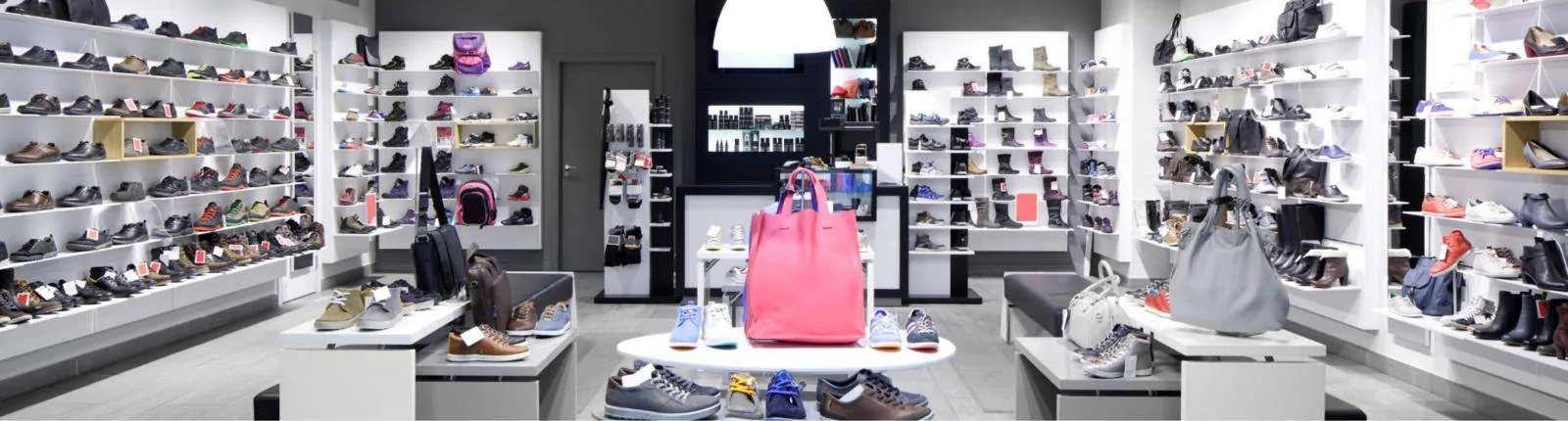
Most shoplifting happens where staff cannot see: at the back of the shop, behind tall shelving units, near the fitting rooms. During the survey we mark these blind spots on a floor plan and place cameras so that every aisle is seen from at least one angle.
A camera never goes inside the fitting rooms. It can, however, cover the corridor leading to them, so you can see what goes in and what comes out. A monitor near the entrance showing a live feed also helps: customers can see the space is recorded, and that alone deters.
Modern cameras can tell a person from other movement. After closing time you get a phone alert only when a person enters, not every time a poster moves or an illuminated sign switches on.
Till discrepancies, voids and refunds without a receipt are among the most common problems in retail. Many recorders, for example from Hikvision and Dahua, can display the transaction text from the till system on top of the video: items, amount, void. You search for a receipt and immediately see what happened at the counter at that moment.
Whether this works depends on the POS or retail software you use, so we check it during the survey before recommending it. Because we also set up invoicing and myDATA systems, we can talk to your till provider in their own terms.
The till camera is aimed at the transaction, not at the cashier's face all day. This matters legally too: the recording protects the cash, it does not assess the employee.
A camera above the entrance with a people-counting function records how many people come in per hour and per day. Compare that figure with your receipts and you can see how many visitors become customers, which hours need more staff, and whether a window display or a promotion brought people in.
Counting happens anonymously on the camera itself and keeps only numbers. There is no need for facial recognition, which a shop cannot justify. In large, busy stores, video surveillance may require a data protection impact assessment (DPIA), which is worth discussing with your GDPR adviser.
Cameras in a shop are allowed to protect people and property. They do not go in toilets, changing rooms or the staff rest area, and they are not used to check how hard each employee works. Staff are informed in writing before the system goes live.
The "CCTV in operation" sign goes up before the entrance, so customers are informed before they walk in. Footage is kept for up to 15 days and the recorder deletes it automatically, unless an incident has been recorded: then the clip is kept for as long as the case needs it. No audio is recorded.
We are not lawyers. For specific cases, ask your legal adviser or the Hellenic Data Protection Authority (dpa.gr).
A glass shopfront creates strong backlight. Cameras with true WDR show the face, not a dark silhouette.
Where the till supports it, the receipt appears on the video and can be searched by item or amount.
Anonymous hourly footfall figures, useful for rotas, opening hours and promotions.
Person detection in defined zones, with a snapshot to your phone when someone enters out of hours.
Cameras sit on their own VLAN, apart from the POS and the customer Wi-Fi.
An alarm, for example Ajax, with contacts on the door and shutter, working alongside the cameras.
We visit when it is quiet, look at the layout, shelving, till and stockroom, and listen to where you are losing stock.
We mark camera positions and fields of view, the recorder location, signage and any till integration. The quote separates equipment and labour.
Cabling is done before you open or after closing, using trunking that suits the shop's look.
Detection zones, street masks, automatic deletion at 15 days, user accounts with different permissions.
The app on your phones, training on finding and exporting an incident, and a suggested text for informing staff.
Can't find what you're looking for? Call us or send us a message.
From the survey and mounting through to the app on your phone. Cameras that see the spots that matter clearly, record…
See the pageA business alarm you arm from your phone, access cards with a log of every entry and a video intercom. We plan them…
See the pageWe install and configure invoicing and ERP systems that send your documents to myData, the platform of AADE (the Greek…
See the pageA business Wi-Fi installation starts with measurements, not with buying equipment. We place access points where they…
See the pageSend us a floor plan or a few photos and we will suggest positions, the number of cameras and what drives the cost. The site survey in Attica is free.